How business phone system installation works with FastPBX
A traditional phone system needs a technician to install equipment on site, and another visit every time something changes. A cloud business phone system from FastPBX doesn’t: the phone system lives in our data centers, so installation comes down to four steps. Do them yourself, or let our team install everything for you.
- Choose your plan and phones. Pick a plan for each extension, then choose desk, conference or cordless phones from our hardware range (Cisco, Polycom, Grandstream and more), or use the softphone and mobile app instead.
- Keep your number or get a new one. We port your existing business number to FastPBX, or set you up with a new local, toll free or vanity number.
- Plug in your phones. FastPBX phones are plug and play: they’re ready to use the moment they arrive. Connect each one to your network’s PoE (power over Ethernet) switch with the cord provided.
- Fine-tune with our support team. Our 24/7 U.S.-based support checks your internet connection and helps configure the Quality of Service (QoS) settings on your router, so calls stay crystal clear.
Business phone system installation diagram
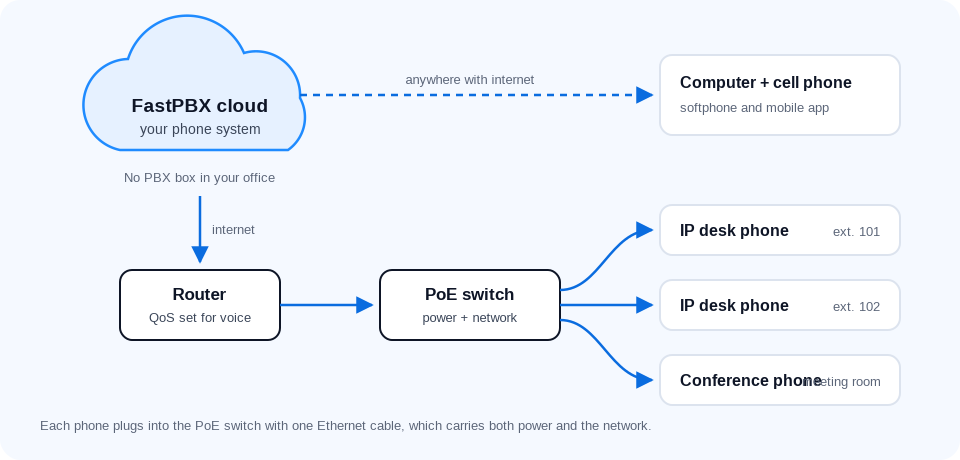
The diagram shows a typical office setup. Your router connects to the internet, and a PoE (power over Ethernet) switch connects and powers every desk and conference phone with a single cable each. The phone system itself runs in the FastPBX cloud, so team members can also make and take calls on their computers and cell phones from anywhere.
That’s it: no PBX box to maintain and no maintenance visits for upgrades.
Prefer professional installation?
FastPBX also installs business phone systems for you. Our team sets up your phones and ports your number, so your office is ready to take calls from day one. Contact us to plan your installation, or try any plan free for 15 days.
Is your business ready for a phone system?
Congratulations! You finally started your business and you’re ready for the influx of customers; except you’re still using your mobile phone and can’t keep your personal and professional contacts separate.
Although this may work for a little while and some entrepreneurs and freelancers might be able to get away with it early on, there will come a time when your credibility will suffer because of your unprofessional communication method.
Instead of having to switch from a personal number to a business number and causing confusion among your customers, start your business off right with an easy business phone system that can give you the features you need now, and evolve with you as you grow.
How a Business Phone System Helps Your Business Grow
Happy customers are generally repeat customers, wouldn’t you agree? So, by using VoIP features to improve your call flow and enhance the caller’s experience, you’re actively a path for customer satisfaction.
Aside from giving your customers the service they need, you can also use a selection of features that will help engage your employees as well. Features like ring groups, voicemail to email, and call forwarding allow your customers and employees to harmoniously interact with each other as it places certain controls in the employee’s hands.
By engaging employees in the creation of your call flow, it promotes a sense of contribution and internal regulation which does wonders for morale and focus.
Getting started with your business phone installation
A business phone system doesn’t do the work for you, at least not at first. To get started, you need to be able to meet the initial requirements that will pave the way for a successful installation.
There are a few important factors to consider before deciding whether or not your business is ready for a VoIP business phone system. VoIP Supply has created a list of requirements for deploying VoIP.
Now that you know what’s needed to move forward, there a few more factors you will need to take into consideration.
Virtual Numbers
A phone number is one of the most common ways a customer or prospective customer will contact you. If you already have a business number, porting your number over to a new provider is a simple yet tedious task.
Porting your number requires you to accurately fill out a Local Number Portability (LNP) form in order to reassign the number from one carrier to another. Remember to be as accurate as possible on these forms; any information that does not match what your carrier has on record will slow down the number porting process.
If you don’t have a business phone number yet, you can get started with a virtual phone number: local, toll free, or vanity.
The type of number you choose will depend on how large your business is, how fast you’re seeing growth, and what types of calls you will be making. Each one has its benefits and can be a great asset to your business.
Local numbers make it easier to reach customers and prospects in your area. If someone sees a caller ID from an unknown number with a familiar area code, there is a greater chance of the call being answered. These numbers work great for local, family-owned stores and new businesses trying to build their local presence.
Toll free numbers are a crowd favorite among business owners who have multiple locations and want to foster a unified presence. 800 numbers also build a company’s credibility and professional status. Call centers and larger enterprise companies prefer these types of number.
Vanity numbers make your business phone number easy to remember, which makes it easy for people in need of your products or services to get in touch with you. If you can get away with using a vanity number for your business from the start, take advantage of it! Not only will it look nice on business cards and other marketing collateral, it will also resonate with your target market and leave a lasting impression.
IP Business Phones
A business phone system is only as good as the devices used to communicate between parties. When you have outdated equipment that can’t measure up to the call volume, your call quality suffers, which results in bad experiences for the caller.
Avoid these call quality issues with compatible hardware that can help you access the full potential of your phone system.
There are countless brands on the market that offer IP phones to businesses. The type you choose depends on your budget and specific communications needs.
Although there are plenty of brands and models when it comes to VoIP phones, there are three main types of devices you can choose from:
Wireless phone, which allows you to move freely around your workspace while on a call
Softphone, which is an app you install in your computer to integrate with your phone system to make and receive calls easily
Conferencing phone, which operates similarly to an analog phone but can be used where multiple calls between several parties take place.
Keeping a fax machine or an analog phone? An analog telephone adapter like the Grandstream HT801 connects it to your VoIP service.
If you’re not looking to purchase any hardware for your business phone system, there are mobile-friendly options that allow you to use your business phone system through your smartphone; although, there are limitations.
Some of the best brands on the market include Polycom, Cisco, Grandstream, and Yealink. Not ready to purchase just yet? Some providers offer hardware rentals with their service as an economic way to get the full experience of your VoIP service.
Business Phone Service
The last thing you need to do before you start setting up your business phone system is, of course, a provider.
There is no shortage of business phone service plans but it can be difficult to know which service will work for your business needs.
Not every business needs all the bells and whistles to get by; some might do all right with a simple business phone and a lower-tier service plan.
The goal is to decide first what it is you want out of your new business phone service and use that as your criteria for choosing one that suits your business.
Once you’ve found the right service, a solid business number, and the right hardware, your VoIP provider will onboard you with minimal downtime and hassle.
Business phone system installation FAQ
Do I need a technician to install a business phone system?
Not necessarily. Your phone system runs in FastPBX’s data centers, so there’s no PBX hardware to install and you’ll never need a maintenance tech for costly switches or upgrades. Many businesses plug in their phones themselves. If you’d rather not, FastPBX offers professional installation: contact us to schedule it.
Can I keep my business phone number?
Yes. We port your existing number to FastPBX using a Local Number Portability (LNP) form. Make sure the details on the form match your current carrier’s records exactly, since any mismatch slows the port down.
What equipment do I need?
A reliable internet connection and a phone for each user: an IP desk phone, a conference phone for meeting rooms, or the FastPBX softphone and mobile app. Desk phones draw power from a PoE network switch. Not sure what fits your office? Browse our office phones or ask a cloud specialist.
Can I try it before I commit?
Yes. Every plan comes with a 15-day free trial and no contracts. Payment is needed to port your number and activate a paid service, but if you’re not happy you can get a full refund within 15 days.
Try FastPBX free for 15 days.
Unlimited U.S. and Canada calling, no contract, and 24/7 U.S.-based support on every plan.